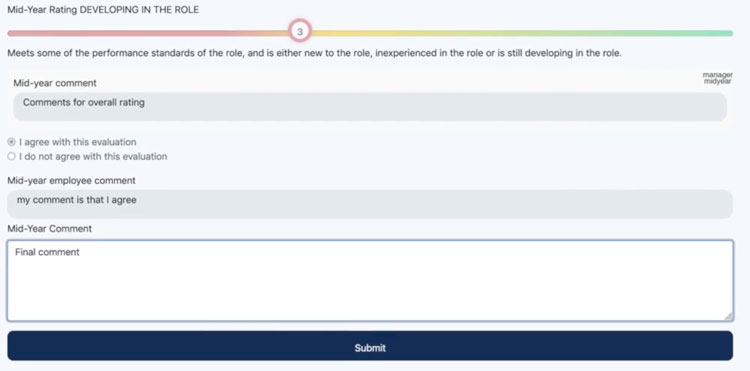
In Section 4 the Manager and Employee create an agreement between each other that all the collected information from Sections 1,2 & 3 are correct.
Before completing Section 4 each of the previous sections must be submitted for agreement.
The Manager will then be able to go to Section 4 and complete the overall rating score and provide a comment.
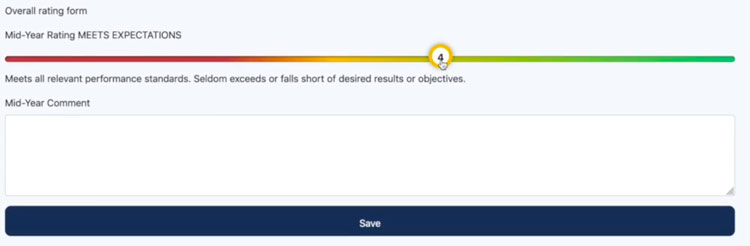
Clicking the 'Save' button will trigger an email to be sent to the Employee
sample of the email below

Turosi Performance Management Notification
Your Manager has completed the Performance Review, it’s now ready for you to review and agree with, please click the link below.
https://performance.turosi.net/user/8/turosi_performance_review/2021/mid/section4
Regards, The Turosi Team
The Employee will be able to click on the link from the email to visit Section 4 for the Performance Review. It's important to note that the Employee must be logged into the application to view this link.
The Employee will see the overall rating and comment given by the Manager and then be able to complete a checkbox of either;
- I agree with this evaluation
- I do not agree with this evaluation
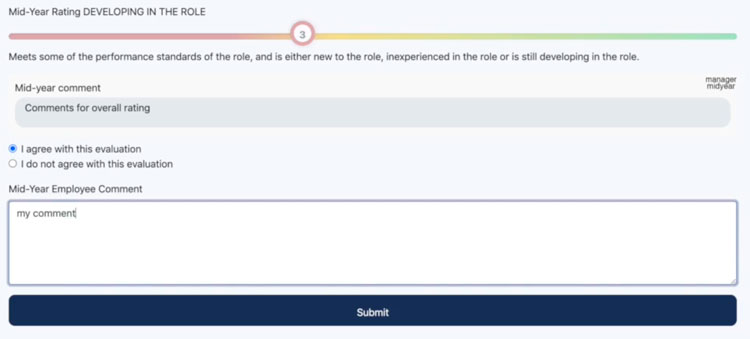
Once again the 'Save' button will trigger an email, this time to the Manager to see the agreement, employee's comments and make a final comment on the Performance Review.